I have taught and overseen coding classes for kids for years — first at other programs, and now at Bright Coders. In that time, I have watched hundreds of children take their first steps into programming. Some lit up immediately. Others got frustrated and quietly disengaged. And after seeing both outcomes more times than I can count, I have developed some strong opinions about what actually works.
This article is not a neutral comparison. It is what I would tell you if you asked me directly: "Which language should my child start with?"
The short answer is that the most important factor at the beginning of a coding journey is usually not which language or topic a child learns first — it is how to keep them motivated long enough to continue learning.
That depends on three major things: whether they are studying alone or with a teacher, their expectations going in, and their age.
Learning with a teacher or structured class often makes a huge difference because beginners will inevitably run into confusion and frustration. This is especially true with languages like Python and JavaScript, where even small syntax mistakes can stop a program from working. Students who expect coding to feel challenging at times tend to persist much longer than students who expect everything to work immediately.
Age also matters, but not because younger students are incapable of coding. The bigger difference is that younger children are often still getting comfortable with typing and with following multi-step logical thinking. Writing code requires both. Older students usually progress faster simply because they can type more fluently and understand abstract logic more easily, while younger students often need more guidance, repetition, and patience at the beginning.
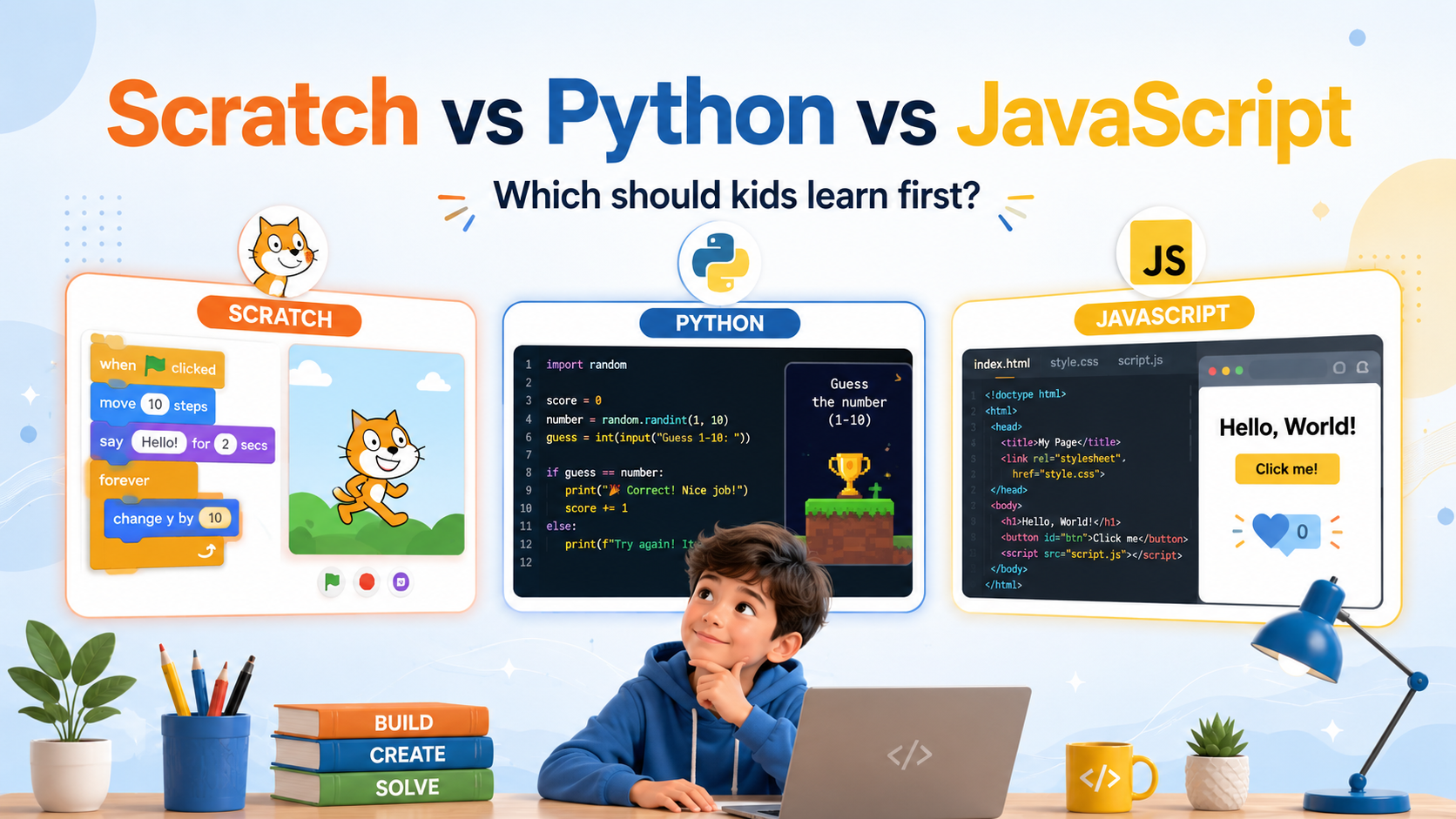
Scratch is a visual, block-based coding language developed by MIT. Instead of typing code, kids drag and snap colorful blocks together to build animations, stories, and simple games. There is no syntax to memorize, no terminal to configure, and no error message telling a child they forgot a semicolon.
That last point matters far more than most people realize. One of the most consistent patterns I have seen in kids' coding classes is that early frustration — not lack of ability — is what makes children give up. And that frustration almost always comes from the environment fighting back: a cryptic error message, a program that refuses to run for reasons the child cannot see, a setup process that takes twenty minutes before a single line of code is written. Scratch removes nearly all of that friction. Within minutes of opening it, a child can have a character moving across the screen. That immediate sense of I made something is genuinely powerful, and it is not something you can manufacture artificially.
Through Scratch, kids absorb the core logic of programming — sequencing, loops, conditions, events, and debugging — without ever feeling like they are studying computer science. They are just making their cat dance.
•No syntax errors means kids focus entirely on logic and creativity, not punctuation
•Instant visual feedback — something moves on screen within minutes
•Zero installation required; it runs entirely in a browser
•The gentlest possible on-ramp for younger children (ages below 8)
•The only language I confidently recommend for self-paced, independent learners
•Block-based coding does not translate directly into text programming skills
•Projects eventually hit a ceiling — Scratch cannot build the kinds of things older kids want to make
•The transition to a text language still has to happen eventually
Scratch is my top recommendation for any child who will be learning to code without a teacher. I want to be direct about this because I think it is the most practically useful thing I can tell you: self-learning Python or JavaScript as a first language is genuinely rough for most kids. Setting up a Python environment means installing software, choosing a code editor, and figuring out how to run a script from the command line — before writing a single line of actual code. JavaScript means wrestling with HTML and CSS at the same time. Both involve error messages that are confusing even to adults. Without a teacher to troubleshoot alongside them, many kids hit these walls and conclude that coding is "not for them" — when the real problem was just the tooling.
Scratch sidesteps all of that. It is also the natural starting point for younger children or anyone who learns visually. If your child enjoys storytelling, animation, or games, Scratch will feel like play rather than school. That is not a compromise — that is the goal.
Python is a text-based programming language known for its clean, readable syntax. Of all the text languages a child might learn first, Python is the one I would choose — not because it is the most exciting, but because it is the least cluttered. It reads almost like plain English, it enforces tidy structure, and it does not ask beginners to juggle multiple concerns at once. The child can focus on the logic of what they are trying to do rather than fighting the language itself.
Python is also genuinely consequential in the real world. It is the dominant language in data science, artificial intelligence, automation, and scientific computing. Kids do not need to know that yet, but it means the skills they build are not a dead end — they are a foundation.
That said, Python is not without friction for beginners. Setting up a Python environment — installing the right version, choosing an editor, understanding how to run a file from the terminal — is a real barrier. Python's output is also often text-based, which can feel anticlimactic compared to the instant visual feedback of Scratch. A child who just spent an hour in Scratch watching their sprite do backflips may not be immediately impressed by a program that prints Hello, world! to a black screen.
•The most readable syntax of any mainstream text language — closer to plain English than most
•Keeps the focus on programming fundamentals without layering on web design complexity
•Widely used in high-demand fields, so skills remain relevant long-term
•Works well for kids who enjoy logic, math, and systematic problem-solving
•Visual and game-based projects are possible with libraries like Turtle, Pygame, and Tkinter
•Environment setup is a real hurdle, particularly for self-learners without guidance
•Text-based output can feel less immediately rewarding than visual languages
•Requires patience and structure to get past the early "nothing exciting is happening yet" phase
•Significantly more effective with a teacher or a well-designed course than on its own
In my experience running classes, Python works best when there is a teacher or a structured curriculum involved. A good instructor absorbs the setup friction, keeps the projects interesting, and catches the moments when a child is about to give up on a bug that is actually one line away from being solved. Without that support, the early stages of Python can feel unrewarding in a way that discourages kids who would otherwise be excellent programmers.
If your child is around 9 or older, enjoys puzzles and logical thinking, and will have a teacher or a well-structured course guiding them, Python is one of the best investments you can make in their coding education. The fundamentals they build here — how to think through a problem, how to structure a solution, how to debug systematically — transfer to every language they will ever learn.
JavaScript is the programming language of the web. It works alongside HTML (which gives a page its structure) and CSS (which controls how it looks) to make websites interactive. Buttons that respond to clicks, animations that play, quizzes that score themselves — all of that is JavaScript.
For kids who are drawn to design and creativity, JavaScript can be deeply motivating. They write a few lines of code, refresh the browser, and something changes on screen. That tight feedback loop is one of JavaScript's genuine strengths as a learning tool, and it is part of why web development remains one of the most popular entry points into programming.
The challenge is that JavaScript rarely travels alone. To build anything meaningful on the web, kids also need to understand HTML and CSS. That is three interconnected systems to learn at once, which adds real cognitive load — especially if the underlying goal is to understand programming fundamentals rather than web design. In the right context, that breadth is exciting. For a child who is genuinely motivated by building websites, it all feels connected and purposeful. For a child who just wants to learn to code, it can feel like a lot of noise before getting to the interesting part.
•Immediate visual results in the browser, with no installation or setup required
•Projects are easy to share — a working URL is more satisfying than a file on a desktop
•Directly relevant to web development, one of the most accessible and in-demand career paths
•Highly motivating for creative kids who care about how things look and feel
•Enormous community and an abundance of free tutorials, tools, and resources
•Requires learning HTML and CSS in parallel, which increases the learning surface area significantly
•Syntax is less forgiving than Python for absolute beginners
•Design concerns (layout, colors, fonts) can pull attention away from programming logic
•Browser quirks and console errors can be confusing without a teacher to interpret them
JavaScript is a strong first text language for children who are genuinely excited about building things for the web — kids who want to make something their friends can visit and interact with. That motivation matters. The best language is often the one the child actually wants to use.
Like Python, though, JavaScript benefits significantly from teacher support, especially in the early stages when HTML, CSS, and JavaScript are all being introduced together. A good instructor can sequence those concepts in a way that feels manageable rather than overwhelming.
The simplest way I can put it, after years of teaching all three: Scratch is for learning to think like a coder. Python is for learning to write code like a professional. JavaScript is for learning to build for the web.
Not at the same time. Coding skills transfer remarkably well. A child who has spent real time in Scratch already understands loops, conditions, and debugging — they just did not call it that. When they move to Python, they are not starting from zero; they are translating familiar ideas into a new syntax. The same happens when moving from Python to JavaScript, or in any direction.
The syntax changes. The thinking carries over. So do not stress about picking the perfect first language. Pick the right one for right now, and let the rest follow naturally.
Based on everything I have seen in the classroom, here is how I would guide you:
Choose Scratch if your child is younger (roughly under 8), brand new to coding, or will be learning mostly on their own. It is also the right choice for any child who learns visually, gets easily discouraged by errors, or just needs to experience the joy of making something before committing to the harder work of text programming.
Choose Python if your child is ready for text programming, enjoys logic and problem-solving, and will have a teacher or a structured course guiding them. It builds the strongest foundation for long-term growth in coding.
Choose JavaScript if your child is genuinely excited about building websites and interactive projects, and has a teacher or course to guide them through learning HTML, CSS, and JavaScript together in a coherent way.
All three can be excellent first steps into coding for kids. The one that works is the one your child will actually stick with.
At Bright Coders, everything we build is designed around the principles in this article — helping kids stay motivated, build real projects, and genuinely enjoy the learning process.
After teaching coding to many children, I noticed that one of the hardest stages for beginners is the transition from Scratch to text programming — or starting directly with text programming for the first time. Many students suddenly run into typing difficulties, syntax errors, and more abstract logical thinking, which can make coding feel frustrating very quickly.
Because of that, my company and I have spent years trying to make the beginning of text programming as fun, approachable, and rewarding as possible.
Our Intro to Python course is built for children who are ready to move into text programming. It teaches coding fundamentals through hands-on activities, quizzes, and game-building projects, with enough structure and guidance to help students get past the early friction and into the rewarding part of coding.
Our Intro to Web Programming course is designed for children who are excited by websites, design, and interactive experiences. Students learn HTML, CSS, and JavaScript together in a sequence that makes each piece feel connected and purposeful instead of overwhelming.
In both courses, students do not just passively follow instructions — they build real projects they can be proud of. The goal is not simply to “learn coding,” but to help children feel confident creating with technology from the very beginning.
Join our 2-month free course and give your child a strong, confident start in coding.